Print controls
Set raster output to 72, 150 or 300 DPI, choose RGB, CMYK or grayscale, and add bleed or crop marks for print handoffs.

SonicWorks
Figma plugin
Export compressed, print-ready PDFs from your Figma file. Select the frames you need, set document output options, and create a shareable PDF without leaving your design workflow.
Includes 10 free exports with Pro features. No credit card required.
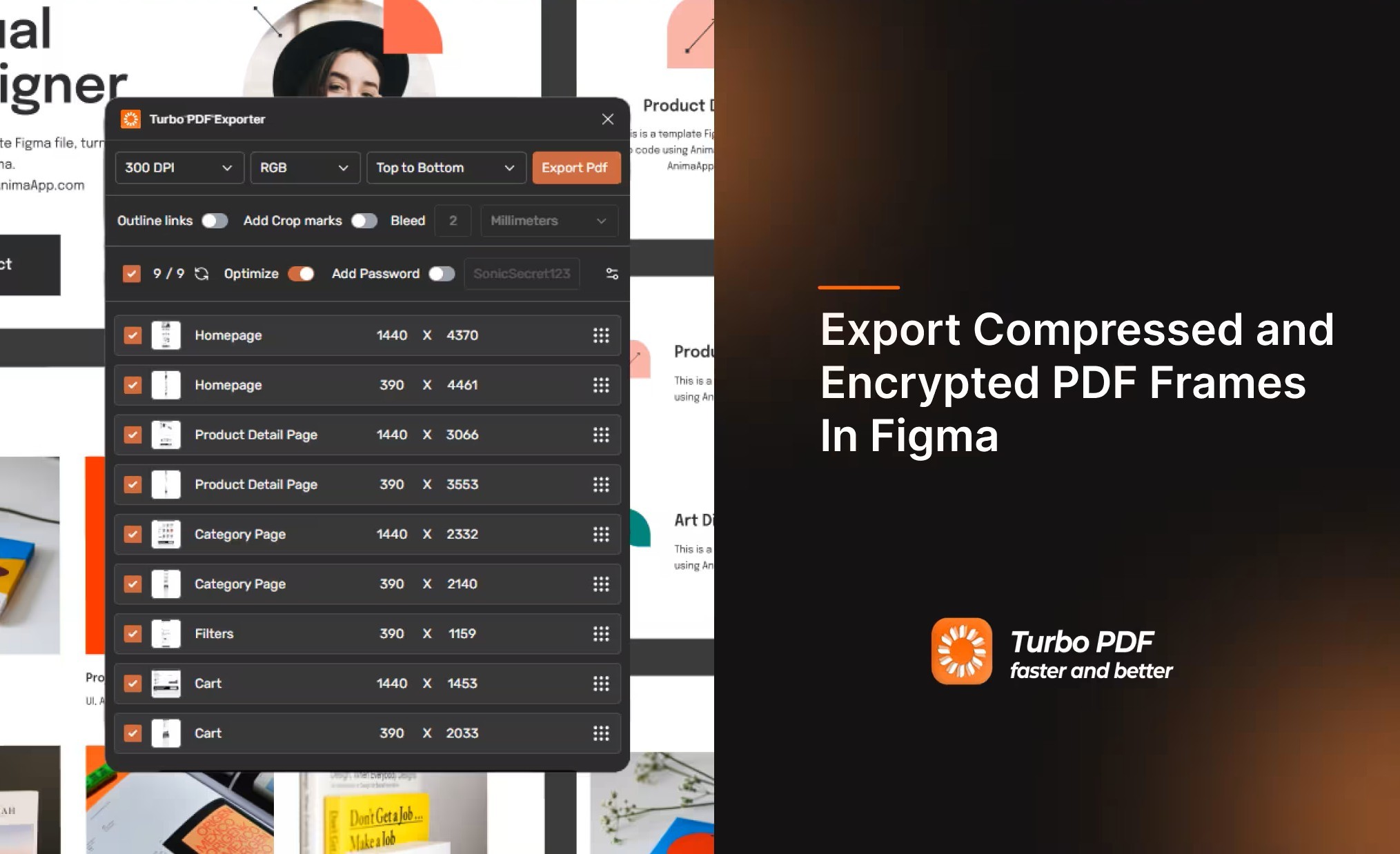
Prepare complete PDF handoffs without leaving Figma. Choose the frames and page order, set output and print options, then optimize and protect the document before sharing.
Set raster output to 72, 150 or 300 DPI, choose RGB, CMYK or grayscale, and add bleed or crop marks for print handoffs.
Select multiple Figma frames, arrange their page order, and bring a collection of screens or artboards into one shareable PDF.
Optimize PDF output to help reduce file size, then add optional password protection before sharing sensitive documents.
Keep text and vector paths crisp and scalable in the exported PDF while raster content uses the resolution you choose.
PDF processing runs inside the plugin workflow. License validation may use the network, but design files are not uploaded for processing.
Keep the export process close to the design. Select frames, review their order, choose document settings, and export a PDF for the next step in your workflow.
Select the Figma frames you want to include. Each selected frame becomes a page in your final document, so you can gather screens, artboards, or presentation pages in one place.
Put pages in the right order, then choose output resolution and color mode. Set the options to suit a print handoff, client review, or digital sharing.
Add bleed or crop marks for print, optimize the output, and enable password protection when needed. Review your selections, then export the finished PDF.
Commercial Print & Pitch Ready: Configure raster output up to 300 DPI, CMYK and grayscale output, bleed allowances, and password protection with Turbo PDF Exporter and Compressor.
Prepare multi-page documents for print, client review, or secure sharing from the Figma file you already have open.
Set DPI, color mode, bleed and crop marks to prepare artwork for print. Check final specifications with your print provider.
Collect selected screens or pages in one PDF, reorder them, and share a compact document for feedback or presentation.
PDF processing runs in the Figma plugin workflow. License validation may use the network, but design files are not uploaded for processing.
Choose frames and page order, then set resolution and color mode. Add bleed and crop marks for print or choose lighter settings for digital sharing.
Optimize the PDF and add password protection when needed. File size varies with the document and export settings, so review your output before sharing.
Need image assets too? Pair it with Turbo Image Compressor & Exporter for batch conversion, resizing and compression.
Compare Turbo PDF Exporter & Compressor with Figma native export.
| Feature & Capability | Turbo PDF Exporter & CompressorRecommended | Figma Native |
|---|---|---|
Merge Multiple Frames into One PDF Combine multiple canvas frames into a single unified multi-page PDF | ||
Print-Ready CMYK & Grayscale Modes CMYK output option for print workflows; confirm profile requirements with your printer | ||
Custom Bleed Margins & Crop Marks Configurable bleed margins and printer trim alignment marks on pages | ||
DPI Control (72, 150, 300 DPI) Choose raster output resolution; preserved vector text and shapes remain scalable | ||
PDF Password Encryption Lock confidential client decks, pitch presentations, and invoices | ||
Vector Text & Path Preservation Keeps text and vector shapes crisp and scalable without raster pixelation | Supported | |
Local File Processing PDF processing stays in Figma; license checks may use the network | ||
Free trial access Try the Pro PDF workflow with 10 free exports. | 10 free exports | Built-in export |
Compare monthly pricing with the monthly equivalent for yearly billing. Annual plans are billed once per year.
| Product | Monthly | Yearly equivalent Billed annually |
|---|---|---|
Compress, convert and resize batches of Figma images for web and app delivery. | $10.00/mo | $8.00/mo |
Prepare multi-page PDFs for print or review with page ordering, color options and password protection. | $5.00/mo | $4.00/mo |
Turbo PDF Exporter & Compressor and Turbo Image Compressor & Exporter BundleBest value Use both plugins under one subscription for a complete image and PDF export workflow. | $15.00/mo | $12.00/mo |
Answers about exporting, print settings, file privacy, and using the PDF plugin in Figma.
Yes. Select multiple frames and arrange their order for a single multi-page PDF export.